If you have ever waited 10 seconds for a single API call to return before your program could move on, you already understand why async programming matters. Instead of blocking on one slow operation, async code starts multiple tasks at once and picks up results as they arrive.
This guide takes you from zero to writing real async Python — no theoretical deep dives, just working code you can use today.
1. Why Async Matters for Developers
Synchronous code runs one task at a time. If task A takes 5 seconds, task B waits. Async code runs tasks concurrently — both start immediately, and the program handles whichever finishes first.
| Scenario | Synchronous | Async |
|---|---|---|
| 3 API calls, each 2s | 6 seconds total | ~2 seconds total |
| Read 10 files | Reads one after another | Reads all at once |
| Scrape 5 pages | Sequential fetching | Parallel fetching |
Async is not about making individual operations faster. It is about doing more at the same time so the overall wait shrinks.
Async programming is most useful for I/O-bound work: network requests, file reads, database queries. For CPU-bound tasks (heavy math, image processing), use multiprocessing instead.
2. async/await Basics
Two keywords form the core of Python async:
async— marks a function as asynchronous. Python knows it may pause and resume.await— pauses the function until the awaited operation finishes, then resumes. While paused, other async tasks can run.
# A simple async function
import asyncio

async def say_hello():
    print("Hello!")
    await asyncio.sleep(1)   # Pauses for 1 second (non-blocking)
    print("Hello again!")

# Run it
asyncio.run(say_hello())
That asyncio.sleep(1) is the async equivalent of time.sleep(1). The difference: asyncio.sleep lets other tasks run during the wait. time.sleep freezes everything.
3. Running Multiple Tasks Concurrently
The real power shows when you run several async operations at once. asyncio.gather() starts multiple tasks and waits for all of them.
import asyncio
import time

async def fetch_data(name, delay):
    print(f"Starting {name}...")
    await asyncio.sleep(delay)  # Simulate a slow API call
    print(f"Finished {name} (took {delay}s)")
    return f"{name} result"

async def main():
    start = time.time()

    # Run all three at the same time
    results = await asyncio.gather(
        fetch_data("API_A", 2),
        fetch_data("API_B", 3),
        fetch_data("API_C", 1),
    )

    elapsed = time.time() - start
    print(f"All done in {elapsed:.1f}s (not 6s!)")
    print(results)

asyncio.run(main())
Output:
Starting API_A...
Starting API_B...
Starting API_C...
Finished API_C (took 1s)
Finished API_A (took 2s)
Finished API_B (took 3s)
All done in 3.0s (not 6s!)
['API_A result', 'API_B result', 'API_C result']
Three tasks that would take 6 seconds sequentially finish in 3 seconds when run concurrently.
4. Real-World Example: Async API Calls
Here is how you make concurrent HTTP requests with aiohttp — the async version of requests.
import aiohttp
import asyncio

async def fetch_url(session, url):
    async with session.get(url) as response:
        return await response.text()

async def fetch_multiple(urls):
    async with aiohttp.ClientSession() as session:
        tasks = [fetch_url(session, url) for url in urls]
        results = await asyncio.gather(*tasks)
        return results

urls = [
    "https://httpbin.org/get",
    "https://httpbin.org/ip",
    "https://httpbin.org/headers",
]

results = asyncio.run(fetch_multiple(urls))
for r in results:
print(r[:100])requests library inside async functions. It is synchronous and will block the entire event loop. Use aiohttp or httpx (which supports both sync and async) instead.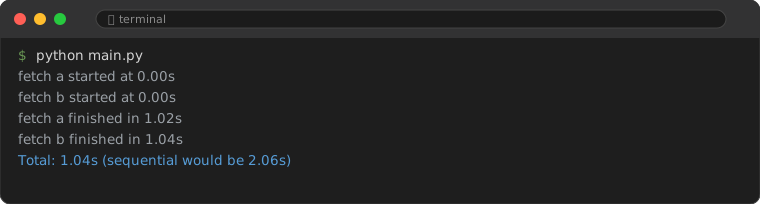
5. Async File Operations
For file I/O, use aiofiles — the async file library.
import aiofiles
import asyncio

async def read_file(path):
    async with aiofiles.open(path, mode="r") as f:
        contents = await f.read()
    return contents

async def write_file(path, data):
    async with aiofiles.open(path, mode="w") as f:
        await f.write(data)

async def process_files(paths):
    tasks = [read_file(p) for p in paths]
    contents = await asyncio.gather(*tasks)
    return contents
6. Task Management: create_task and wait
asyncio.gather is the most common way to run tasks, but sometimes you need more control.
create_task — Start a task without waiting
async def main():
    task = asyncio.create_task(some_slow_operation())

    # Do other work while the task runs in background
    print("Task started, doing other things...")
    result = await some_quick_operation()

    # Now collect the background task result
    slow_result = await task
    print(f"Slow result: {slow_result}, quick result: {result}")
wait — Control which tasks to collect
async def main():
    tasks = [asyncio.create_task(fetch_data(f"Task_{i}", i)) for i in range(5)]

    # Wait for ALL to finish
    done, pending = await asyncio.wait(tasks)
    print(f"All {len(done)} tasks completed")

    # Or: wait for at least 2 to finish
    done, pending = await asyncio.wait(tasks, return_when=asyncio.FIRST_COMPLETED)
    print(f"First {len(done)} tasks done, {len(pending)} still running")
7. Timeouts and Error Handling
Network calls fail. APIs go down. You need timeouts.
async def fetch_with_timeout(url, timeout=5):
    try:
        async with asyncio.timeout(timeout):
            async with aiohttp.ClientSession() as session:
                async with session.get(url) as resp:
                    return await resp.text()
    except TimeoutError:
        print(f"Request to {url} timed out after {timeout}s")
        return None

async def main():
    # This will timeout if the server takes more than 5 seconds
    result = await fetch_with_timeout("https://httpbin.org/delay/10", timeout=5)
    print(result)  # None — it timed out
For handling exceptions in gather, use return_exceptions=True:
results = await asyncio.gather(
    fetch_data("good_api", 1),
    fetch_data("broken_api", 2),  # This one raises an exception
    return_exceptions=True,
)

for r in results:
    if isinstance(r, Exception):
        print(f"Error: {r}")
    else:
        print(f"Success: {r}")
8. Async Context Managers and Iterators
Just like with blocks and for loops, async has its own versions.
# Async context manager (aiohttp uses these)
async with aiohttp.ClientSession() as session:
    async with session.get("https://example.com") as resp:
        data = await resp.text()

# Async iterator (streaming responses)
async with session.get("https://example.com/large") as resp:
    async for chunk in resp.content.iter_chunked(1024):
        process(chunk)
9. Common Mistakes
9.1. Calling async functions without await
Calling async def without await returns a coroutine object — it does not execute the function body. You must await it or pass it to asyncio.gather.
async def fetch():
    return "data"

# WRONG: coroutine never runs
result = fetch()  # Returns a coroutine object, not "data"

# RIGHT: actually execute it
result = await fetch()  # Returns "data"
9.2. Blocking the event loop with sync code
Any synchronous blocking call (time.sleep, requests.get, heavy CPU work) inside an async function blocks all other async tasks. If you must run blocking code, offload it:
# Run blocking sync code in a separate thread
result = await asyncio.to_thread(blocking_sync_function, arg1, arg2)
9.3. Mixing sync and async frameworks
You cannot use requests inside asyncio or aiohttp inside a plain sync function without asyncio.run(). Pick one paradigm per function and stick with it.
9.4. Creating too many concurrent tasks
asyncio.gather with 1000 tasks opens 1000 connections simultaneously. This can overwhelm servers or hit rate limits. Use asyncio.Semaphore to throttle:
sem = asyncio.Semaphore(10)  # Max 10 concurrent tasks

async def limited_fetch(session, url):
    async with sem:
        async with session.get(url) as resp:
            return await resp.text()
10. Async in AI Workflows
Async programming is particularly valuable when working with AI APIs and models:
async def query_multiple_models(prompt, models):
    """Send the same prompt to several AI APIs concurrently."""
    async with aiohttp.ClientSession() as session:
        tasks = []
        for model in models:
            task = query_model(session, prompt, model)
            tasks.append(task)
        results = await asyncio.gather(*tasks, return_exceptions=True)
        return results

async def stream_ai_response(session, url, payload):
    """Stream an AI model response chunk by chunk."""
    async with session.post(url, json=payload) as resp:
        async for line in resp.content:
            if line:
                yield parse_chunk(line)
This pattern lets you compare responses from multiple AI providers in parallel, or stream large model outputs without blocking your application.
11. When NOT to Use Async
- CPU-heavy computation: Image processing, matrix math, data transforms. Use
multiprocessinginstead. - Simple scripts: If your script makes one request and exits, sync code is simpler and fine.
- Legacy frameworks: Some older libraries have no async support. Wrapping them in async adds complexity without real benefit.
The rule is straightforward: if your code spends most of its time waiting for external resources (network, disk, API), async helps. If it spends most of its time computing, async does not help.
Frequently Asked Questions
Is asyncio the only async library in Python?
No — trio and curio are alternatives with different design philosophies. But asyncio is built into the standard library and has the most ecosystem support. Start with asyncio.
Can I use async in Flask or Django?
Flask 2.0+ supports async route handlers. Django 3.1+ also supports async views. For high-traffic async applications, consider FastAPI or Starlette — they are built for async from the ground up.
What is an event loop?
The event loop is the engine that runs async code. It keeps track of pending tasks, wakes them when their awaited operations complete, and moves to the next task when one pauses. asyncio.run() creates and manages this loop for you.