Python virtual environments are every developer's first headache. You start with venv, hear about Poetry, get told conda is "for data science," then discover uv and wonder if you've been doing it wrong this whole time.
In 2026, four tools dominate the conversation. This guide compares them all — speed, features, and a clear verdict for your use case.
1. At a Glance
| Tool | Type | Best For | Speed |
|---|---|---|---|
| venv | Built-in | Simple projects, beginners | Baseline |
| Poetry | Dependency manager | Published libraries, teams | Slow |
| conda | Package + env manager | Data science, non-Python deps | Slowest |
| uv | Ultra-fast package manager | Everything — the 2026 default | 10-100x faster |
2. venv — The Built-in Baseline
What it does: Creates isolated Python environments. Ships with Python — nothing to install.
# Create
python -m venv myenv

# Activate (macOS/Linux)
source myenv/bin/activate

# Activate (Windows)
myenv\Scripts\activate

# Install packages
pip install requests

# Deactivate
deactivate
Pros: Zero dependencies. Ships with Python. Every tutorial assumes you use it.
Cons: No dependency locking. No version management. Pip is slow compared to modern tools.
Verdict: Fine for learning and tiny scripts. Outgrown for real projects.
3. Poetry — The Dependency Manager
What it does: Manages dependencies with a lock file (poetry.lock) and a declarative config (pyproject.toml).
# Install Poetry
pip install poetry

# New project
poetry new myproject
cd myproject

# Add dependencies
poetry add requests
poetry add --group dev pytest black

# Install all dependencies (respects lock file)
poetry install

# Run a script
poetry run python main.py
Pros: Clean pyproject.toml. Lock file for reproducible builds. Great for publishing packages.
Cons: Dependency resolution can be very slow (minutes on large projects). Doesn't manage Python versions.
Verdict: Still solid for library authors, but losing ground to faster tools.
4. conda — The Data Science Swiss Army Knife
What it does: Manages environments AND installs packages (including non-Python ones like CUDA, R, C++ libraries).
# Create environment with specific Python version
conda create -n myenv python=3.12

# Activate
conda activate myenv

# Install packages
conda install numpy pandas matplotlib

# Export environment
conda env export > environment.yml
Pros: Handles non-Python dependencies (CUDA, system libs). Built-in Python version management. Huge data science package repository.
Cons: Slow solver. Massive base install size (~500MB+). Not suitable for simple web projects.
Verdict: Stay with conda if you do data science / ML. Otherwise, switch to something lighter.
5. uv — The 2026 Default (and Why It Wins)
uv is built by the team behind Ruff (the Python linter). It's written in Rust and is very fast — 10-100x faster than pip and Poetry. In 2026, uv replaces pip, venv, pip-tools, pyenv, and most of what Poetry does — all in one tool.
# Install uv (one command)
curl -LsSf https://astral.sh/uv/install.sh | sh

# Create a virtual environment
uv venv

# Activate (same as venv)
source .venv/bin/activate  # macOS/Linux
.venv\Scripts\activate     # Windows

# Install packages (fast!)
uv pip install requests fastapi

# Or use uv add for Pyproject.toml projects
uv init myproject
cd myproject
uv add requests
uv add --dev pytest

# Run a script
uv run python main.py

# Lock dependencies
uv lock
uv sync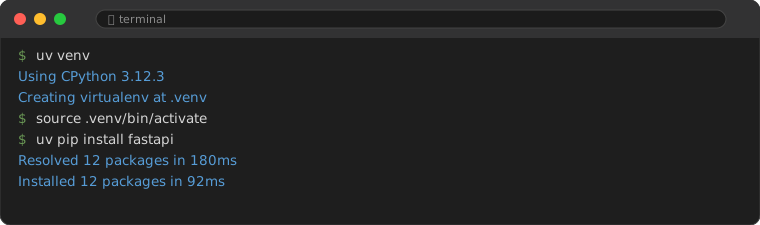
Speed Comparison (Real Benchmarks)
| Task | pip | Poetry | uv |
|---|---|---|---|
| Create environment | 0.3s | 1.2s | 0.01s |
| Install Django | 3.4s | 5.1s | 0.1s |
| Install scikit-learn | 12.0s | 18.2s | 0.5s |
| Resolve + lock (large project) | N/A | 90s+ | 0.8s |
For new Python projects in 2026, uv is the default recommendation. It's faster, simpler, and replaces multiple tools with one.
6. Decision Guide: Which One Should You Use?
| Your Situation | Use This | Why |
|---|---|---|
| Just learning Python | venv | Built-in, no setup, every tutorial covers it |
| Building a web app / side project | uv | Fast, simple, pyproject.toml, replaces pip+venv |
| Creating a Python library | uv or Poetry | Both support publishing; uv is faster |
| Data science / machine learning | conda | Handles CUDA, non-Python deps, Python version mgmt |
| Large team / company | uv | Lock file + reproducible + fast CI/CD |
The bottom line: if you are starting a new project in 2026, use uv. The speed difference alone will make you never want to go back.
Frequently Asked Questions
Can I switch from pip to uv mid-project?
Yes. uv is fully compatible with pip. Run uv pip install -r requirements.txt and you are switched. No migration needed.
Does uv work with Docker?
Yes. uv is excellent in Docker — its speed saves significant build time. Just add COPY --from=ghcr.io/astral-sh/uv:latest /uv /usr/local/bin/uv to your Dockerfile.
Is uv stable for production?
Yes, as of 2026 uv is production-ready. Major companies have adopted it for their Python workflows.