You are writing Python code. You type import requests or import pandas. And then — boom:
ModuleNotFoundError: No module named 'requests'This is the single most common Python error beginners face. It is frustrating, but it is almost always caused by one of five things. This guide covers all of them, with the exact fix for each.
1. The Module Is Not Installed (Most Common)
Python does not ship with every library you might need. Libraries like requests, pandas, and numpy must be installed separately.
The Fix
pip install requestsTo install multiple packages at once:
pip install requests pandas numpyHow to Check If a Package Is Installed
pip list | grep requestsOr in Python:
import importlib.util
print(importlib.util.find_spec("requests"))
2. You Installed It in the Wrong Environment
This is the number one mistake that trips up even experienced developers. You installed the package, but into the wrong Python environment.
Scene 1: Virtual Environment Confusion
You activated a virtual environment, installed a package, then deactivated it. Later, you run your script — but you forgot to reactivate the venv.
# Check which Python you are actually using
which python
# or on Windows:
where python
If the path does not point to your virtual environment, activate it:
# macOS / Linux
source myenv/bin/activate

# Windows
myenv\Scripts\activate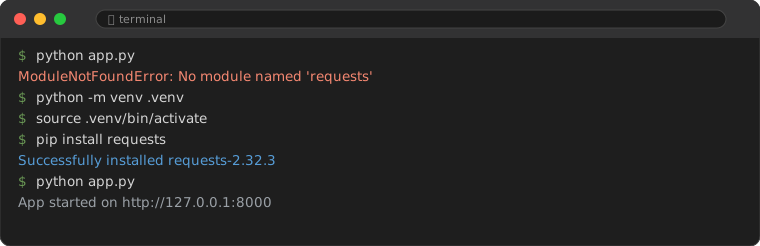
Scene 2: IDE Using the Wrong Interpreter
VS Code, PyCharm, and other IDEs may be configured to use a different Python interpreter than the one you installed packages into.
In VS Code: Press Ctrl+Shift+P → type "Python: Select Interpreter" → choose the correct one (look for the venv path).
In PyCharm: File → Settings → Project → Python Interpreter → check the path matches your environment.
3. Typo in the Module Name
Python module names are case-sensitive and exact. Common typos:
| Wrong | Correct |
|---|---|
Beautifulsoup | bs4 (install) or beautifulsoup4 |
PIL | Pillow (install) / PIL (import) |
sklearn | scikit-learn (install) / sklearn (import) |
cv2 | opencv-python (install) / cv2 (import) |
flask | Flask — but installed as flask |
Always double-check the install name vs import name.
4. Python Path / PYTHONPATH Issues
If you are importing your own modules (not third-party libraries) and getting ModuleNotFoundError, the issue is Python's search path.
Python Searches in This Order:
- The directory containing the script you are running
- Directories listed in the
PYTHONPATHenvironment variable - Standard library directories
- Site-packages (where pip installs things)
The Fix: Make Sure Python Can Find Your Module
# Option 1: Run from the project root
cd /path/to/project
python -m mypackage.mymodule

# Option 2: Add to sys.path (temporary fix)
import sys
sys.path.append("/path/to/my/module")
import mymodule

# Option 3: Create a proper package with __init__.py
# myproject/
#   mypackage/
#     __init__.py    ← empty file makes this a package
#     mymodule.py
5. pip vs pip3 Confusion (macOS / Linux)
On macOS and Linux, you may have both Python 2 and Python 3 installed. Running pip install might install for Python 2, while your script runs Python 3.
The Fix
# Always be explicit
python3 -m pip install requests

# Or use the versioned pip
pip3 install requests
Quick Diagnostic Checklist
Before you start Googling, run through these checks:
- Is the package installed? →
pip list | grep packagename - Am I in the right environment? →
which python - Is there a typo? → Check install name vs import name
- Is my IDE using the right interpreter? → Check IDE settings
- Am I running from the right directory? →
pwdand checksys.path
99% of ModuleNotFoundError cases are solved by one of these five checks. You can stop scrolling Stack Overflow now.
Common Pitfalls
Watch out for these mistakes that keep developers stuck:
Pitfall 1: Installing globally, running in a venv
You run pip install pandas without activating a virtual environment, then activate a venv and expect pandas to be there. Virtual environments are isolated — packages installed globally do not carry over. Always activate the venv first, then install.
Pitfall 2: Naming your script the same as a module
File named requests.py and you run import requests? Python imports YOUR file instead of the library. Rename your script to something else — my_requests.py works.
Pitfall 3: Forgetting to install the package in requirements.txt
You add import newlib to your code but forget to add newlib to requirements.txt. Co-workers (or your CI pipeline) hit the error. Always update your requirements file immediately when adding a dependency.
Frequently Asked Questions
What is the difference between ModuleNotFoundError and ImportError?
ModuleNotFoundError is a subclass of ImportError. It specifically means Python cannot find the module at all. A general ImportError can mean the module was found but something inside it failed to import.
Why does my module work on my machine but not on my friend's?
You probably have the package installed globally but your friend does not. Always use a requirements.txt file to share exact dependencies.
Should I always use virtual environments?
Yes. Every project should have its own virtual environment. It prevents dependency conflicts and makes your project reproducible. Use python -m venv venv to create one in each project.