Every message you send to a hosted chatbot can be logged, reviewed, or used for training. For personal notes, code, or company data, that is a problem. The fix is simple: run the model on your own hardware. With Ollama (to serve the model) and Open WebUI (a ChatGPT-like interface), you get a fully private assistant that never leaves your machine.
I set this up on a Linux workstation and a MacBook. Here is the exact path, with screenshots from a real install.
1. Why Run a Model Locally?
- Privacy. Your prompts never hit a third-party server.
- No per-token cost. After the download, inference is free.
- Offline. Works on a plane, in a secured network, anywhere.
- Customizable. Swap models, tweak system prompts, plug in tools.
2. Install Ollama and Pull a Model
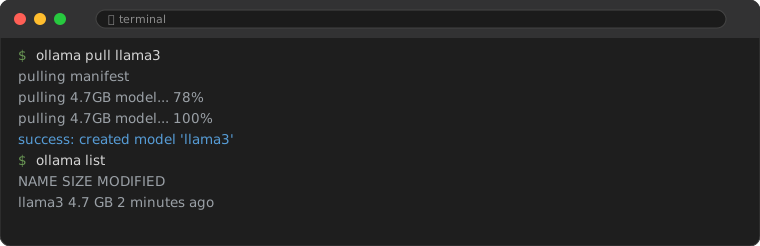
Install from ollama.com (macOS, Windows, Linux). Then pull a model — I start with llama3:
ollama pull llama3This downloads about 4.7 GB. Watch the progress:
You can chat from the terminal immediately:
ollama run llama3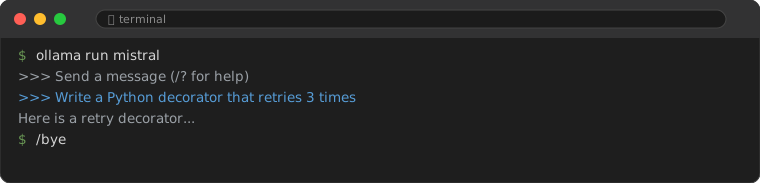
3. Add the Chat Interface (Open WebUI)
The CLI is fine for quick prompts, but you want a real interface. Open WebUI is the standard — and the easiest install is via Docker:
docker run -d -p 3000:8080 \
  -v open-webui:/app/backend/data \
  --name open-webui \
  ghcr.io/open-webui/open-webui:main
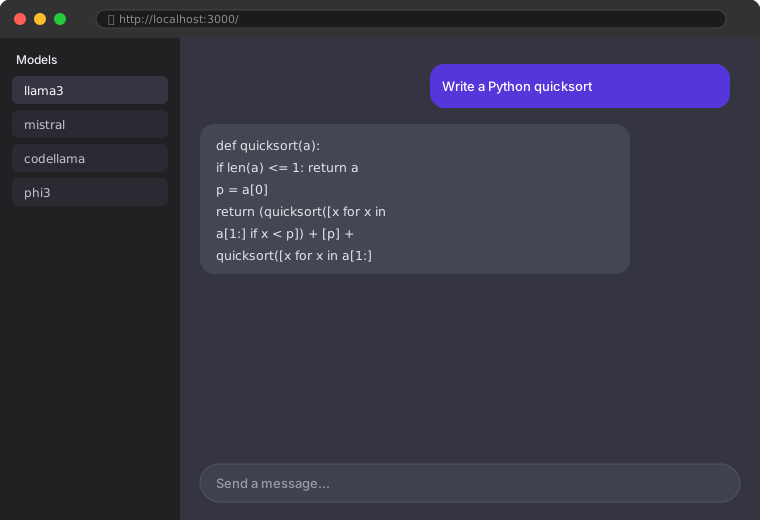
Open http://localhost:3000, create an account (local only), and you are in. The first dropdown lets you pick any model Ollama has pulled — llama3, mistral, codellama, whatever you have.
4. Use the Model from Python
Open WebUI is for chatting; for code, call Ollama directly. The ollama Python package is the simplest path:
import ollama

resp = ollama.chat(
    model="llama3",
    messages=[{"role": "user",
               "content": "Write a Python function to retry on failure"}]
)
print(resp["message"]["content"])
This is the same engine that powers the web UI. I covered the CLI and Python basics in the Ollama local LLM guide; this article focuses on the private-chatbot setup.
5. Hardware: What Actually Works
| Model | RAM needed | Speed on CPU | With a GPU |
|---|---|---|---|
| llama3 (8B) | 8 GB+ | Slow but usable | Fast |
| mistral (7B) | 8 GB+ | Similar to llama3 | Fast |
| codellama (7B) | 8 GB+ | Good for code | Fast |
| llama3 (70B) | 32 GB+ | Not practical | Excellent |
No GPU? The 7–8 B models still run on a modern CPU; expect a few tokens per second. Fine for drafting, not for real-time chat feel. An Apple Silicon Mac or any CUDA GPU changes the experience completely.
6. The Privacy Payoff
With this setup, the model weights and your conversation history live on your disk. Open WebUI stores chats in its local volume (open-webui:/app/backend/data), and Ollama keeps models in its own cache. Nothing is sent to OpenAI, Anthropic, or anyone else. For handling client code or personal documents, that distinction matters.
7. Mistakes to Avoid
- Exposing port 3000 to the internet. If you host this on a server, put it behind a reverse proxy with authentication. Do not开放 0.0.0.0:3000 directly.
- Forgetting the model is not the latest GPT. Local 7–8 B models are capable but lag frontier models on reasoning. Use them where privacy beats peak quality.
- Running out of disk. Models are gigabytes each. Check free space before
ollama pull.
Frequently Asked Questions
Is Open WebUI required?
No. ollama run works in the terminal, and many editors integrate Ollama directly. Open WebUI just gives you the familiar chat UI and history.
Can I use my own fine-tuned model?
Yes. Drop a GGUF file into Ollama's models directory (or ollama create from a Modelfile) and it appears in the Open WebUI dropdown.
Does this replace a paid ChatGPT subscription?
For privacy-sensitive work, yes. For the hardest reasoning or longest context, frontier hosted models are still stronger. I use both depending on the task.
You now have a private assistant that runs offline and answers to no one but you. Pair it with the Ollama developer guide to wire models into your own Python tools.