Merge conflicts are every developer's least favorite Git experience. You pull, you merge, and suddenly your terminal looks like a crime scene. But conflicts are not scary — they are just Git saying "I need a human to decide." This guide shows you exactly how to resolve them.
1. What Is a Merge Conflict?
A merge conflict happens when Git cannot automatically merge two branches because both branches changed the same line in the same file. Git pauses the merge and asks you to decide which version to keep.
A merge conflict is not an error. It is Git being safe — refusing to guess which version you want.
2. How to Identify a Conflict
When you run git merge or git pull and there is a conflict:
$ git merge feature-branch
Auto-merging app.py
CONFLICT (content): Merge conflict in app.py
Automatic merge failed; fix conflicts and then commit the result.
Check which files have conflicts:
git status
# Unmerged paths:
#   both modified:   app.py
3. Understanding Conflict Markers
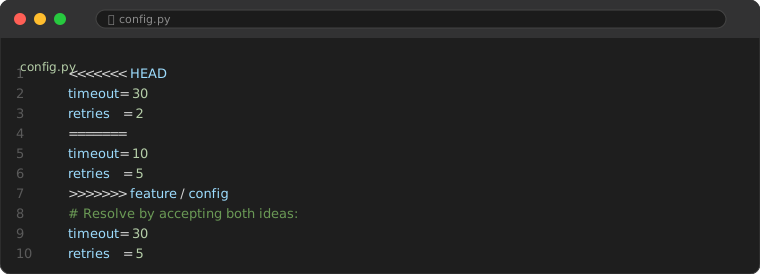
Open the conflicted file. Git inserts markers:
<<<<<<< HEAD
print("Hello from main branch")
=======
print("Hello from feature branch")
>>>>>>> feature-branch| Section | Meaning |
|---|---|
<<<<<<< HEAD to ======= | Your current branch's version (the branch you are ON) |
======= to >>>>>>> branch-name | The incoming branch's version (the branch you are MERGING) |
4. Resolving Conflicts (Command Line)
- Open the conflicted file in any text editor
- Find the conflict markers (
<<<<<<<,=======,>>>>>>>) - Decide: keep your version, their version, or combine both
- Delete the markers and the version(s) you do not want
- Save the file
- Stage and commit:
git add app.py
git commit -m "Resolve merge conflict in app.py"
5. Resolving Conflicts in VS Code (Easier)
VS Code highlights conflicts visually and gives you one-click options:
- Accept Current Change — keep your version
- Accept Incoming Change — keep their version
- Accept Both Changes — keep both (one after the other)
- Compare Changes — see a side-by-side diff
6. Want to Bail Out? Abort the Merge
git merge --abortThis undoes the entire merge and returns you to the state before you started. Safe and clean.
7. How to Prevent Merge Conflicts
- Pull often. The longer you wait, the more divergence accumulates.
- Keep branches short-lived. Merge small, frequent PRs — not monster branches with 50 changed files.
- Communicate. If two people are working on the same file, talk about it.
- Use rebase before merge.
git pull --rebaseapplies your commits on top of remote changes, avoiding most conflicts. - Configure merge tools. Set up a merge tool once:
git config --global merge.tool vscode.
8. Complex Conflict: Entire File Rewritten
When two branches rewrote the same file completely differently:
# Option A: completely replace with one version
git checkout --theirs path/to/file
git add path/to/file

# Option B: completely keep your version
git checkout --ours path/to/file
git add path/to/file
Common Pitfalls
Avoid these mistakes when resolving conflicts:
Pitfall 1: Committing with conflict markers still in the file
Rushing through a merge and leaving <<<<<<< or >>>>>>> markers in your code. This breaks syntax and your build. Always run git diff --check before committing to catch leftover markers.
Pitfall 2: Blindly accepting one side without reading
Clicking "Accept Incoming Change" or "Accept Current Change" without understanding what the other side changed. You may delete important work from the other branch. Read both sides before deciding.
Pitfall 3: Continuing to work while in a merge state
Starting new changes before committing the merge resolution. If you then reset or abort, you lose uncommitted work. Always commit the resolution first, then continue coding.
FAQ
What happens if I commit conflict markers?
Your code will have syntax errors and fail to run. Always double-check that you removed ALL <<<, ===, >>> markers before committing.
Can I avoid conflicts entirely?
Not 100%, but you can make them rare. Small branches + frequent pulls + good communication = almost never see a conflict.