VS Code is the most popular code editor on the planet. But out of the box, it is just a text editor. Extensions turn it into a full development environment. The problem: there are over 60,000 extensions in the marketplace. Most are noise.
I have tested hundreds of extensions. Here are the 15 that actually make you faster, smarter, and less frustrated — organized by category. All extensions verified working with VS Code 1.95 (November 2024 release) as of June 2026.
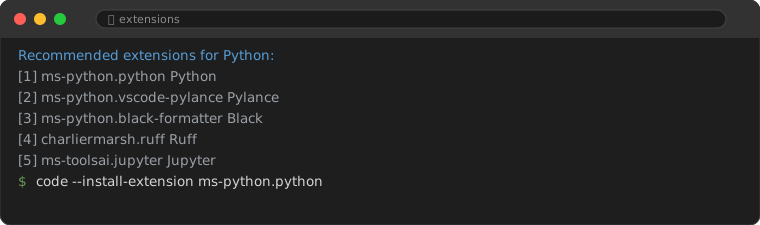
You can install any extension two ways: click Install in the Extensions panel (Cmd+Shift+X), or run code --install-extension <id> from a terminal — handy for scripting your setup across machines. The full Python configuration, including the formatter and debugger, is covered in the VS Code for Python setup guide.
1. AI Coding Extensions
1. GitHub Copilot
The original AI pair programmer. Inline code suggestions, chat with @workspace, and agent mode for multi-file edits. If you install one extension from this list, make it Copilot.
2. GitHub Copilot Chat
The chat companion to Copilot. Ask questions about your code, get explanations, refactor, and generate tests — all without leaving VS Code.
3. Continue
Open-source AI coding assistant that works with any LLM — OpenAI, Anthropic, Ollama (local), or your own. Best choice if you want to use free local models or avoid vendor lock-in.
2. Code Formatting & Linting
4. Prettier
The de facto standard for code formatting. Supports JavaScript, TypeScript, HTML, CSS, JSON, Markdown, and more. Configure once, and never argue about formatting again.
5. ESLint
Catches JavaScript/TypeScript bugs before they happen. Combines linting with auto-fix. Pair with Prettier for the complete code quality setup.
6. Ruff (Python)
In 2026, Ruff has replaced Flake8 + isort + pyflakes + dozens of plugins. It is written in Rust — 10-100x faster than the tools it replaces. Instant linting feedback as you type.
3. Git Integration
7. GitLens
Supercharges VS Code's built-in Git. See who changed what line and when (blame annotations), visual branch history, commit graph, and code authorship at a glance.
8. Git Graph
A beautiful, interactive Git commit graph. View branches, merges, and commit details. One click to checkout, revert, or cherry-pick. Way better than git log --graph.
4. Productivity Boosters
9. Path Intellisense
Autocompletes file paths as you type. Saves you from typing ../../../components/ over and over. A small extension with a big quality-of-life improvement.
10. Error Lens
Shows errors and warnings inline — right next to the problematic code, not buried in the Problems panel. You see issues instantly without switching context.
11. Better Comments
Color-codes your comments based on prefix: TODO (orange), FIXME (red), NOTE (blue), etc. Turns comments into a visual task board inside your code.
5. Themes & Visual Polish
12. One Dark Pro
The most popular theme in VS Code history for a reason. High contrast, easy on the eyes, works for long coding sessions. If you have not found a theme you love, start here.
13. Material Icon Theme
Replaces the default file icons with clean, recognizable Material Design icons. Makes your file tree instantly scannable.
6. Docker
14. Docker (Official)
Manage Docker containers, images, and Docker Compose from VS Code. Syntax highlighting for Dockerfiles, IntelliSense for compose files, and one-click container start/stop.
7. Remote Development
15. Remote - SSH
Edit code on a remote server as if it were local. Connect via SSH, browse files, use extensions on the remote machine — all seamlessly. Essential for cloud servers, Raspberry Pi, or any remote development.
8. Quick Setup Checklist
If you want the essential starter pack, install these 5 and you are set:
- GitHub Copilot + Copilot Chat
- Prettier
- ESLint or Ruff
- GitLens
- One Dark Pro
Everything else is icing. These 5 will cover 90% of your daily productivity needs.
Frequently Asked Questions
Do too many extensions slow down VS Code?
Yes. Each extension adds startup time and memory. Stick to extensions you actually use daily. Uninstall the rest.
What extensions should I NOT install?
Avoid extensions with poor reviews, few downloads, or no recent updates. Avoid duplicate functionality (only one linter, one formatter). Avoid extensions that request broad file system or network permissions without clear reason.
Are these extensions free?
All extensions listed here are free. GitHub Copilot has a free tier for verified students and open-source maintainers; otherwise $10/month.